

Solution that enables mobility

Features
Specifications
Accessories
FAQs
How it Works
How to Buy
Download Leaflet
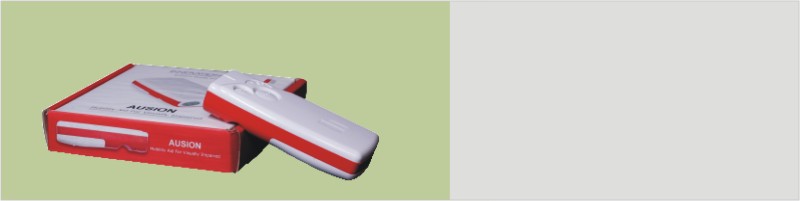
Ausion is developed as a part of our vision to Enhance Quality of Living for visually impaired by providing a Mobility and Navigation solution. The current version of Ausion is the result of several years of research.
Ausion is an innovative electronic mobility and travel aid for the visually impaired. Based on the principle of echolocation, Ausion enables people with severe visual disabilities to move around indoors and outdoors with confidence and least assistance. Like bats, Ausion acquires information about the environment, especially objects and obstacles and translates them into sounds information that can be heard. The interpretations of these audible feedbacks enable the virtual recreation of the environment. Ausion is compact, handheld, manoeuvrable, non intrusive device. It helps Ausion detect overhanging obstacles at the chest, shoulder and head levels. This offers a greater freedom of movement to the user.
The Ausion is an electronic Mobility Aid for the visually impaired; it employs ultrasonic sensors mounted in a handheld device to detect objects in the region immediately in front of the sensors and produces sound patterns which convey information about those objects. Ausion has been designed to provide as much information as possible about the environment in front of the sensors to enable the user to avoid obstacles. The Ausion is built as a handheld device so that it can scan by natural hand movements – Up and Down or Left or Right. This enables Ausion user to direct attention to a particular feature which s/he may be passing, by bringing it into the line of “view” of Ausion. Ausion does not give information about the surface texture of the objects which produce the echo signal. Also, the feedback is restricted to the nearest object to avoid any confusing signals to User. Ausion cannot reliably detect downs or holes in the ground and a primary aid such as the long cane should be used in conjunction with Ausion to cope with this eventuality.The current version of Ausion is the result of several years of research and more than two years of development by InnovationHub Technologies with simple objective of making it useful, simple and affordable to the visually impaired. Ausion is a secondary mobility aid designed to be used indoors and outdoors in conjunction with either a cane or residual vision. It gives the user advanced warning of objects which lie within his or her travel path. Ausion has evolved with active support from NAB (National Association for Blinds) Bangalore and Deepa Academy for Blinds, Bangalore. Mobility Trainers from NAB and actual blind users from NAB and Deepa Academy have provided their inputs at various stages of development. It is the outcome of a research program dedicated to achieving an understanding of mobility and the information requirements of the independent blind traveler. Ausion embodies many of the findings of the interaction with large number of visually impaired; the emphasis is on achieving usefulness and simplicity. The feedback comprises the notes of a musical scale, which make a familiar tonal progression as the user approaches an object. Ausion is covered by patents.
When ultrasound hits an obstruction such as a wall, a person or tree, it is reflected towards Ausion and received by its receiver. The receiver transforms the reflected signals into electrical signals. Ausion computes the time taken for the received signal to reach its sensors and translates it in to distance to obstacle from the user. This distance is translated into audio “notes” to inform the user about the distance to the obstacle. The appropriate “note” of the signal indicates the approximate distance of a reflecting object, being lowest at the maximum range of Ausion and gradually increasing note by note as the object becomes closer. By interpreting the comparative “notes” of the signal the user is able to judge the direction (based on direction the sensors point towards) and distance to the reflecting objects (based on “note” frequency). Ausion outputs a beam which forms a cone of 100 cm base diameter at a distance of 100 cm. Any object with in this cone area is detected by Ausion. It needs some Up and Down movement to detect object at the surface or chest or head levels. Similarly some left and right movement of Ausion will enable detection of objects in a vertical plane.
• Ausion enables people with severe visual disabilities to
move around indoors and outdoors with confidence and least assistance.
• Like bats, Ausion acquires information about the environment, especially objects and obstacles
and translates them into sounds information that can be heard. The interpretations of these
audible feedbacks enable the virtual recreation of the environment.
• Ausion is compact, handheld, manoeuvrable, non-intrusive device. It helps Ausion detect
overhanging obstacles at the chest, shoulder and head levels. This offers a greater freedom of
movement to the user.
• Ergonomic, compact, lightweight, handheld unit
• Selectable range 1 / 2 / 3 meters (upto 1.5 m for soft objects (people or animals))
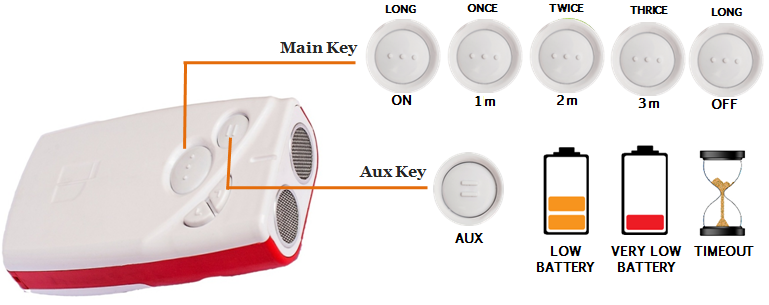
• Easy to use: Two Keys for Distance Range / User Feedback Mode selection
• Unique tonal colors corresponding to object distances
• Continuous and Discrete modes of audible feedback
• Low cost of ownership (Ultra low power consumption)
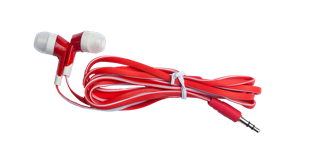
• Audible feedback through earphone
• Size: Length x Width x Height 100 mm x 50 mm x 25 mm
• Weight : 95 grams
• Operating temperature: 0° to 35° C
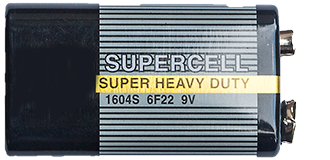
• Battery: Standard 9V 6F22
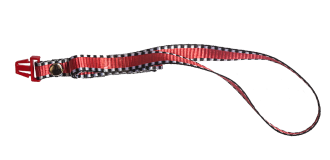
The Power ON procedure is explained in the User Manual. Please refer to the same for details. Ausion can be switched ON by pressing the MAIN key for about 1 second.
Yes. You can get the indication in two ways. When you switch ON Ausion from a previously OFF condition, it gives a unique Power ON Tune. Secondly, if you would like to check if it is already ON, wave your hand in front of Ausion, and it will give certain audio tones.
You have to press the MAIN key for about 1 second and wait for the Power ON tune to be played by Ausion. If this is not the case, please refer to the User Manual.
Yes, it can be done anytime when Ausion is ON.
No, you do not have to remember or recollect any previous settings. You can select the desired range setting anytime you like.
Yes, Ausion uses a standard 9V battery as its power source.
It depends on the actual usage of Ausion. A typical 4 hours of usage per day will ensure that the battery lasts for 5 months or beyond.
No, the battery used in Ausion cannot be charged. Attempting to recharge it may result in an explosion and serious injuries.
These are standard 9V batteries and are available in any electrical store throughout the country. Please dispose of used batteries properly.
You can use any standard earphone/headphone, and the operation of Ausion will not be affected. Ensure that you plug the earphone into only one of your ears to remain aware of environmental sounds.
No, the current version of Ausion does not provide any tactile or vibratory feedback for obstacles.
No, Ausion provides feedback through audio tones and tunes. Good hearing ability is required to use Ausion.
No, you do not need to keep any key pressed while using Ausion for navigation. Simply switch it ON, hold the device in your hand, and scan the environment in front of you.
Your finger may be partially blocking Ausion’s sensors. Move your fingers away from the sensors and place them in the finger guide. If the problem persists, visit a nearby service center.
No, Ausion is not waterproof. It can tolerate a light drizzle but should not be exposed to heavy rain or submerged in water.
Yes, you will be able to replace Ausion’s battery on your own. Ausion is designed in such a way that it provides tactile information about the polarity of the battery. You can feel the polarity information marked inside the battery compartment and install the battery accordingly. Ensure correct polarity. There are no cables or wires to connect.
Ausion uses very low intensity / low energy ultrasound waves. It does not cause any harm and is safe to use on a regular basis.
Ausion does not interfere with the operation of any other electronic equipment or gadget.
No, Ausion will only indicate the presence or absence of an obstacle and not the type or texture.
Unlike the white cane, Ausion is NOT a primary travel aid. It is highly encouraged and recommended that you continue to use Ausion always in conjunction with the traditional white cane.
Yes, it is recommended that you become familiar with standard mobility and cane usage techniques before using Ausion.
Ausion provides an approximate coverage of a 40° cone. This means obstacles within a 1 metre circle at a distance 1 metre away will be detected. Coverage increases with a higher range setting.
Yes, you will be able to detect any overhanging obstacle like a tree branch with Ausion.
While walking with Ausion as the guide, you must scan the area in the front with slight up-down and left-right movements of Ausion with your hand and should not keep it in a static manner. This will ensure that most objects above your head and below the knee are picked up by Ausion. The key is to scan.
No, Ausion is an independent device and does not have the interfaces to connect to a computer or such equipment.
No, currently it is not possible to fix Ausion to the white cane. However, InnovationHub may bring about a provision to mount Ausion on the white cane in the future.
Ausion is a product that evolved after more than two years of R&D, prototyping and testing. It has gone through multiple rounds of field trials with actual users. It incorporates feedback from mobility experts. Ausion uses the latest technology in terms of reliable manufacturing. It is sturdily and ergonomically designed and fabricated in a way that it does not shatter into multiple pieces when it is accidentally dropped from the waist level. We believe that enough care and precaution has gone into the various design and engineering aspects of Ausion. Handled in the proper manner, we believe that Ausion will provide many years of service to the user.
Ausion is completely an indigenous product made in India. Except for a few electronic components, all parts of Ausion are fabricated to the highest standards, within India.
You may adjust the volume level of the feedback from Ausion using the Volume UP and Volume DOWN keys on Ausion. You can increase the volume to a level comfortable to you, by depressing the Volume UP key multiple times.
Yes, it is highly recommended that you undergo a specific training for familiarising yourself with Ausion and the effective ways to use it. The training will equip you with the ability to correlate the tones provided as feedback from Ausion and the corresponding distance to the obstacles, various confirmatory and warning tunes and techniques to handle various situations during mobility.